
Requirements and tips
On this page, you'll be given information about the minimum requirements that your computer and internet connections must meet for successfully participating as a presenter in an OnAIR event. We'll also discuss a number of tips that will help make your presentation the best that it can be.
Computer requirements
Minimum requirements
- Means to connect to the Internet
- Modern Internet browser installed with all current updates
- CPU (processor) equivalent to Intel i5 in power and capability
- 8 gigabytes of memory
- Same computer used for event as that used for practice
- No non-essential or background applications/programs running; all notifications turned off
Enhancements
- CPU (processor) equivalent to Intel i7 in power and capability
- 16 gigabytes of memory
- Desktop computer
- Separate keyboard and mouse
- Two monitors (screens) connected to computer
Internet connection requirements
Minimum requirements
- Wi-fi connection capable of sustained speeds >= 40 megabits (Mb) per second
- No firewall blocking incoming traffic on Port 443; no blocking of traffic to/from OnAIR domain(s)
If you are behind a corporate/company firewall, specific tests must be performed during your practice session to ensure that the firewall is not blocking traffic in either direction.
- Only 1 user/computer using Internet connection
- Same connection used for event as that used for practice
Enhancements
- Wired (ethernet) Internet connection; speed >= 50 megabits (Mb) per second
Audio/video requirements
Minimum requirements
- Video camera connected by wire to your computer or built-in to your computer. Set camera to manual focus or ensure auto-focus does not "hunt" for proper focus.
- Microphone connected by wire to your computer or built-in to your computer. Can be part of a headset.
- Headphones, earphones, ear buds, or headset connected to the audio output of your computer
- All loudspeakers connected to your computer turned off
- Same audio/video equipment and configuration used for event as that used for practice
Enhancements
- Video camera characterized as HD, high definition, 16:9, or similar designation; configured as highest definition, resolution, and/or quality available
- Microphone other than the one commonly found on the cord of ear buds
Location requirements
Minimum requirements
- Quiet area away from noise sources such as running equipment, noisy air vents, barking dogs, flushing toilets, playing children
- Placement of computer, camera, microphone, and chair to allow you to sit in a comfortable position near all of the equipment
- Neutral background within the view of the camera
- Position as far away from background as possible
- Avoid brightly illuminated background
- Primary light source directing light toward your face and slightly off to the right or left of your centerline
- Same location and configuration used for event as that used for practice
Enhancements
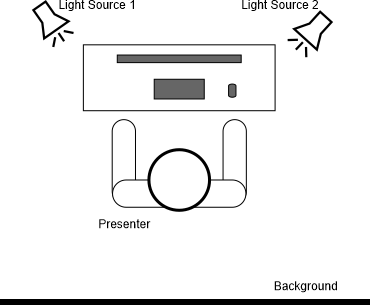
- Two lighting sources (see diagram below)
That's it! Congratulations! Now you're an OnAIR expert!
Click/tap the Back button to go back to the previous page.

