
Going onto the Main Stage
Whew! You've finally made it onto the Main Stage. Typically, the sequence of events was that the event host or master of ceremonies has introduced you and your presentation, and the Studio staff have taken you onto the Main Stage. Take a look at the illustration below to get an idea of the appearance of the Studio now.
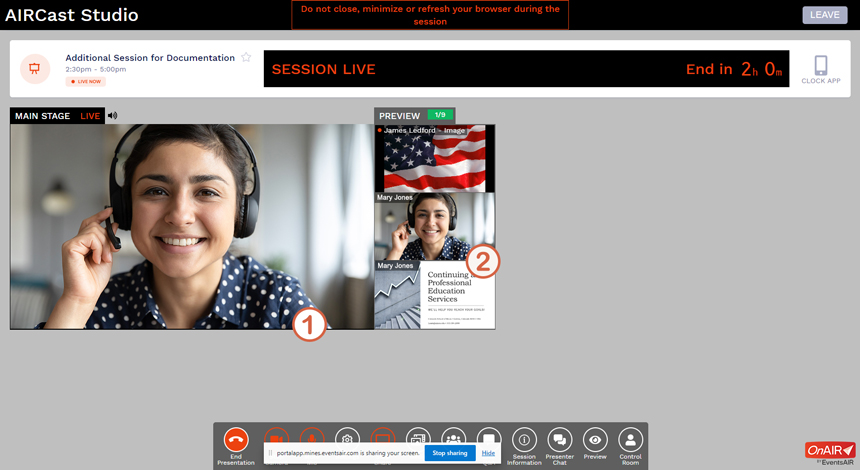
As you can see in the illustration, only one change has occurred.
1 The Main Stage
The video from your camera now appears on the Main Stage, and the audio from your microphone can be heard by all members of the audience. The illustration shows only the video from Mary Jones, our fictional presenter, on the stage, but many other configurations are possible — Mary could be joined on the stage by the MC, another presenter, a video, a still image, or something else. Of course, very soon after Mary appears on the stage, her presentation slides will also appear, perhaps replacing her video or perhaps in a side-by-side arrangement with a small window containing her video. All of the configuration of what appears on the Main Stage and how it is arranged is managed entirely by the Studio staff — with the exception that changing slides in your presentation is still your responsibility.
2 Backstage (the Preview Panel)
You may notice that you still appear to be backstage even though you are also on the Main Stage. That's because the Studio staff uses the content that appears in the Preview Panel while they are switching what appears on the Main Stage and how it is arranged. So you have moved to the Main Stage, but your thumbnail image remains in the Preview Panel for use by the Studio staff.
Quick Tip
If you have used the Mute Mic button in the Control Panel at any time to silence sounds from your location, please be sure to use the button again to un-mute your microphone if you have not done so by the time you are taken onto the Main Stage.
You're up! So give your presentation!
Click/tap the Next button to go to the next page; use the Back button to go back.


